For Filipino sellers, suppliers and event planners

Keep selling on social media.

Sellebrant helps you manage the business behind it.

Simple tools for the work behind your posts: orders, open dates, ready-to-share posts, supplier quotes and identity checks. Use only the one you need. Your page, posts and chats stay where they are.

Prepare your shop, calendar or post first. You create an account only when you are ready to share it.

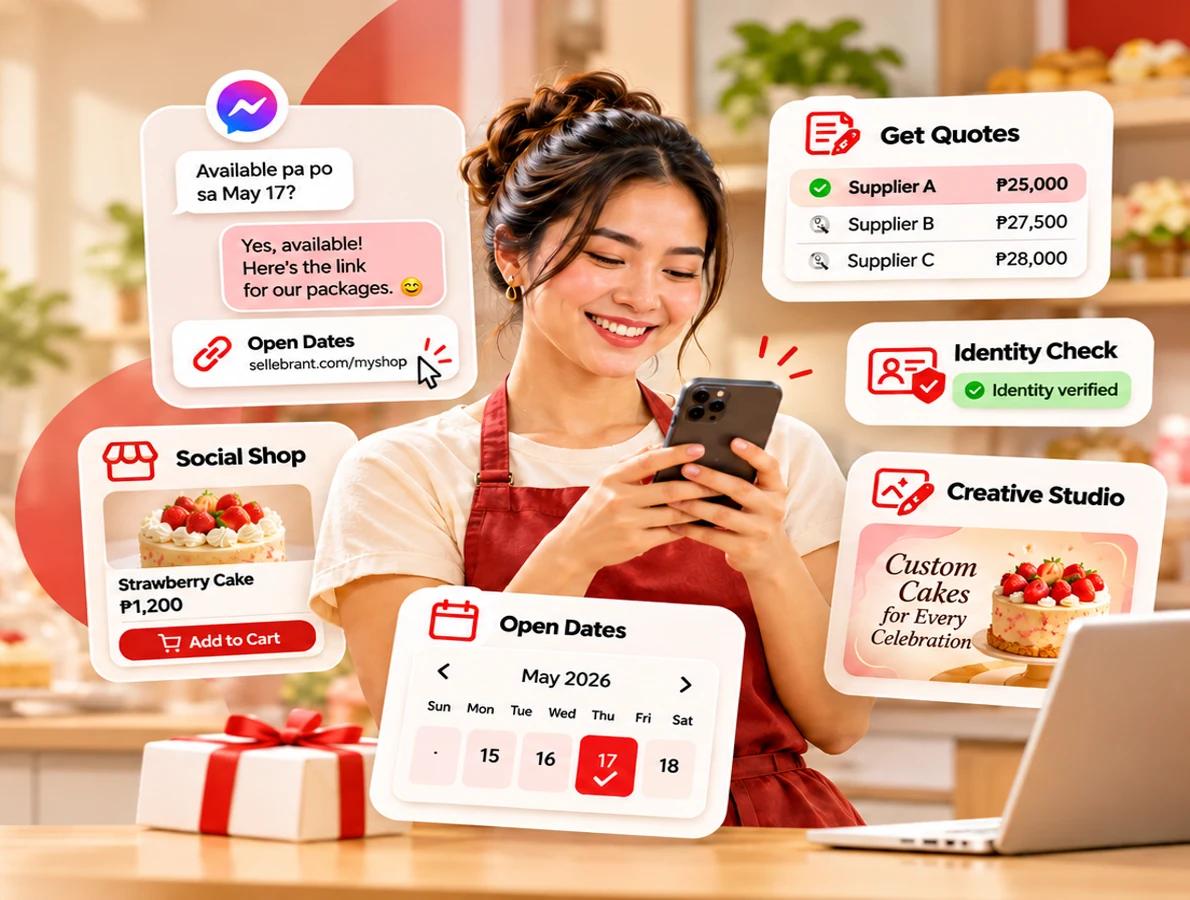
Illustrative Filipino bakery entrepreneur using her phone with examples of Get Quotes, Open Dates, Social Shop, Creative Studio and Identity Check.
Illustrative preview of the tools
Five tools

Pick the tool for the job in front of you.

Each one works on its own. Start with one. Add another only if it helps.

Quick Quotes

For buyers planning an event

Describe your event once and share the request.

“I’m planning an event and need suppliers.”

Describe your event once and share the request. Suppliers send offers, and you compare them side by side before you choose.

Works on its own

Open Dates

For event and appointment services

Share one calendar link with your open dates and packages.

“Available pa po sa Dec 12?”

Share one calendar link with your open dates and packages. Clients send a complete enquiry. You quote and confirm the booking yourself.

Works on its own

Social Shop

For food and product sellers

Share one shop link with your prices and what’s left.

“HM po? May stock pa?”

Share one shop link with your prices and what’s left. Customers order directly, and you see every order in one list instead of in your comments.

Works on its own

Creative Studio

For anyone who posts to sell

Turn product photos into static or animated ads.

“I need ads for tonight.”

Upload a product photo or price list. Photo Studio builds Meta and LinkedIn static ads you can edit. Video Creator turns several images into an animated MP4 with a CTA.

Works on its own. No shop or calendar needed.

Identity Check

For when you need to confirm who you’re dealing with

Before a big order or booking, ask the other person to complete an identity check.

“I want to confirm who I’m dealing with.”

Before a big order or booking, ask the other person to complete an identity check. You see which checks they completed and the result.

It confirms identity details only. It cannot promise how someone will pay, deliver or behave.

Use it only when you need it

How it works

Your page stays. Your chats stay. You just send a better link.

Customers still find you on social media. Sellebrant takes care of the part that usually needs many messages.

  1. 1

    A customer messages you

    On your page, in the comments or in your inbox.

    “Paano po mag-order?”
  2. 2

    You reply with your link

    Your shop, calendar or request link. One tap to copy.

    sellebrant link → your shop
  3. 3

    They see the details and act

    Prices, stock, open dates or offers are clear, so they can order, enquire or choose.

    New order · 2 boxes · Pickup Sat

Share links anywhere your customers already are:

  • Facebook
  • Messenger
  • Instagram
  • TikTok
  • WhatsApp
  • Viber
  • Any chat, as a link
AI help

AI does the typing. You make the decisions.

Start from what you already have, like a menu photo, a price list or an old post. No need to type everything again.

See how AI helps
  1. 1
    Upload what you haveA photo, menu, price list or brochure.
  2. 2
    AI prepares a draftProduct names, prices, packages or captions it finds in your file.
  3. 3
    AI shows what’s missingFor example, how many you have in stock, or what a package includes.
  4. 4
    You check, fix and approveThen you publish, share or send.

AI never does these

  • Make up prices, stock, dates or inclusions. It only uses what you give it.
  • Post, send or confirm anything without your approval.
  • Reply to your customers for you.

AI help is part of Social Shop, Open Dates, Creative Studio and supplier offers in Quick Quotes.

Questions

Common questions

Do I have to stop using Facebook or Messenger?

No. Keep posting and chatting where your customers are. Sellebrant gives you links and tools for the work behind those chats.

Do I need to use all five tools?

No. Each tool works on its own. If you later use a second tool, your account and business details come with you, so you don’t type them again.

Do I need to sign up before I try?

You can prepare your shop, calendar or post first. You create one Sellebrant account when you’re ready to publish, share or send, and your draft is kept. The same account works in every tool.

Will AI post or reply for me?

No. AI prepares drafts and points out what’s missing. You check everything before anything is shared or sent.

Is Quick Quotes a tool for sellers?

Quick Quotes starts with a buyer who is planning an event. The buyer shares one request, and suppliers answer it with offers. If you’re a supplier, you can respond to requests shared with you.

What does Identity Check confirm?

It shows which supported identity checks the other person completed and the result. It confirms identity details only. It cannot promise how someone will pay, deliver or behave, so keep your agreement clear.

Identity Check

Use it when you want to confirm who you’re dealing with before a big order or booking.

  1. You send an identity check request to the other person.
  2. They complete the supported checks.
  3. You see which checks they completed and the result.

Identity Check confirms identity details only. It does not guarantee honest behaviour, payment or delivery.

Identity Check screens are not part of this preview yet, so there is nothing to open here today.